Search Hari11888 Blog

FIND YOUR GMAIL ACCOUNT CREATED ( BIRTH ) DATE

Now we will see how to find your gmail account created date. You can feel, in what way it will helpful to you?, But this is very very important. Every one must know this information. It will helpful to you some critical situation. If any one hacked your gmail account means, you need to  reset your password. To reset your password, you need to fill the form provided by Google. At that time, you need the gmail account creation date. At that time this info is very helpful to you. Some members try to find the gmail account creation date for funny or any other purpose. Some members give treat also on gmail account birthday if he feel account mails are more valuable. But knowing this info is very useful to you. Let see, how to detect your gmail account created ( Birth ) date.

You can find gmail account in two ways. First way is, when you created gmail account, suddenly you will get mail from gmail team.  Using that received mail we can find our gmail account created date with exact time. If you saved this email in your label or inbox means you can find it easily. If you deleted or not found means try the second method. Most of the members deleted that mail without know the value of the mail. 

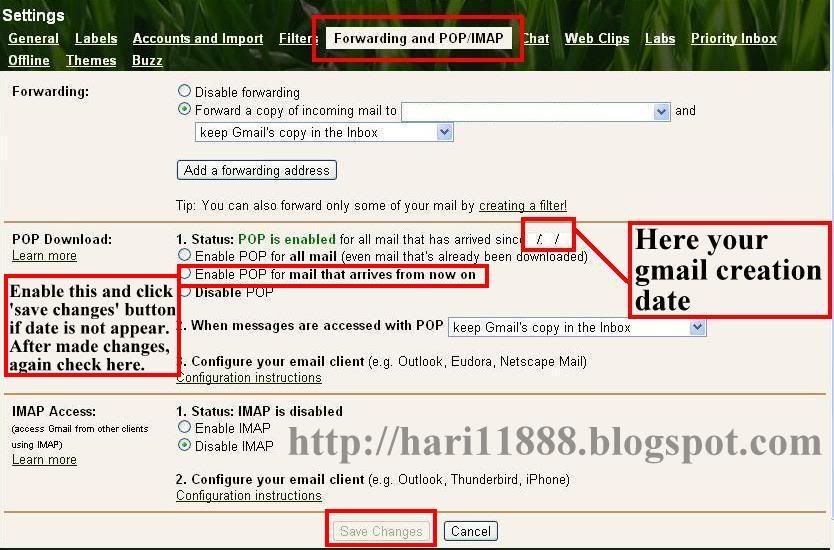
I think second method is works if you create the gmail account on 2007 or later. Don't know exact date. Anyway, if you create before 2007 means also try it. Login to your gmail account and click 'settings' at top right side corner.  Now click the tab 'Forwarding and POP/IMAP'.  Now see the picture below for help. In that tab, you will see POP download. In that status, you will see the creation date of  your gmail account created date where i specified in that picture. If  date is not appear means, enable the  'Enable POP for mail that arrives from now on' by clicking radio button. Now click 'save changes' button. After made changes check again here. Even if not appear (Very rare to happen this ) means enable one more status which you left. Now click 'save changes' button. After made changes check again here. Finally we found birth-date of our gmail account.

HELP


If any body knows any other good idea to find gmail account created date, kindly inform to 'hari11888blog@gmail.com'. Here your idea will update with your name.

DESKTOP PC RECOMMENDED TIPS TO EXTEND PC LIFE - PART 1

Most of the members use desktop pc. These tips will surely helpful to your pc and give long life. Due to electronic item we must take care in our pc. Sometime we will  work with our pc very careless. Avoid it. If we not solve the small problem at initially, it will give big problem in future due to our careless. Follow the simple tips and give long life to your pc.
  • Don't put the cover in cpu and monitor while working. If you like to put the cover over a system, put it after half an hour after you shutdown the pc . We must give the chance to our pc to emits the heat.
  • Most of the members do this wrong, Don't watch the movies by putting cd/dvd in cd/dvd tray. Copy and paste into system. Then watch it.  Now your cd/dvd tray will get long life. Otherwise cd/dvd tray continuously rotate and loss its life.
  • Avoid If you use the 'pin' to come out the cd/dvd tray. If you do this often, it will provide big problem. So solve it soon and use this method only on critical situation. 
  • Don't Format  the hard disk and pen drive often. Format only at rare condition. Life will increase.  
  • Completely avoid Defrag the  Pen drive. Hard disk and Pen drive both are read and write the files using different mechanism. Due to this mechanism pen drive no need defrag, hard disk need the defrag. If we do the defrag in pen drive it affect only the pen drive. So pen drive will lose its life soon if you defrag it. 
  • While Burning data's in cd/dvd using burning software, completely avoid working with other software in pc. Don't run any other program in background also. Before you burn, stop the all working software and then begin the burn. Because, while burning the data in cd/dvd, it requires more ram memory. If you work with other software means, it also use the memory. So due to low memory 'Burning software' displays the error message 'run time error' or any message. If any error displays while burn, cd or dvd  will completely damage or not work.
  • Keep your system always in cool. If you place your pc, in AC  room means, it absorbs the heat emits by system and give long life to your pc. So keep the system in ac as much possible to you.
We will continue  some more important basic tips to improve system life in next part.